One screen, every session
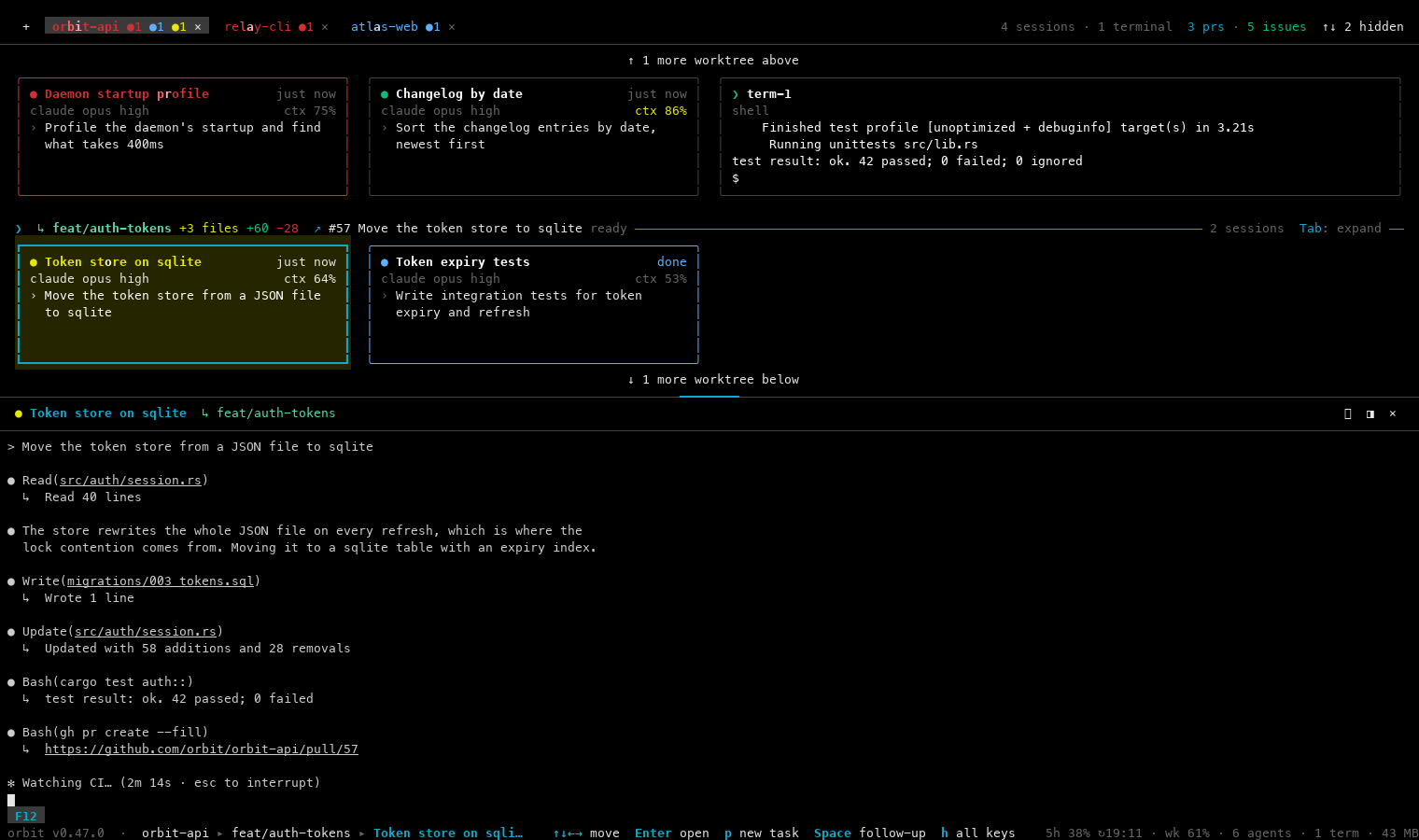
Project tabs, a band per worktree, a card per session, and the live terminal of the card under the cursor beside them.
Run many Claude Code sessions across every project and git worktree you own, from one terminal, one keyboard, one screen. They keep working after you close it.
curl -fsSL https://raw.githubusercontent.com/AmenAdem/Orbit/main/install.sh | sh
Why Orbit
You start three Claude sessions in three terminal tabs. Five minutes later you don't know which one is waiting on a permission prompt, which one finished, and which one is still thinking, so you tab through them all and read.
Orbit replaces the reading with a grid and a colour. Every session is a card with a status dot. Cards sit in a band per git checkout, under project tabs that add up their sessions' dots. A red ●1 on a tab tells you exactly where to look.
One Rust binary and a unix socket. No Electron, no browser, no server.
Features
Built for a Claude-first workflow: many sessions, many worktrees, one screen, and keys you can remember.
Project tabs, a band per worktree, a card per session, and the live terminal of the card under the cursor beside them.
Every card and every tab counts its dots. Red sends a desktop notification, and ; jumps to the next session that needs you.
Quit Orbit, close the laptop, come back tomorrow: the sessions never stopped, and their output is replayed when you return.
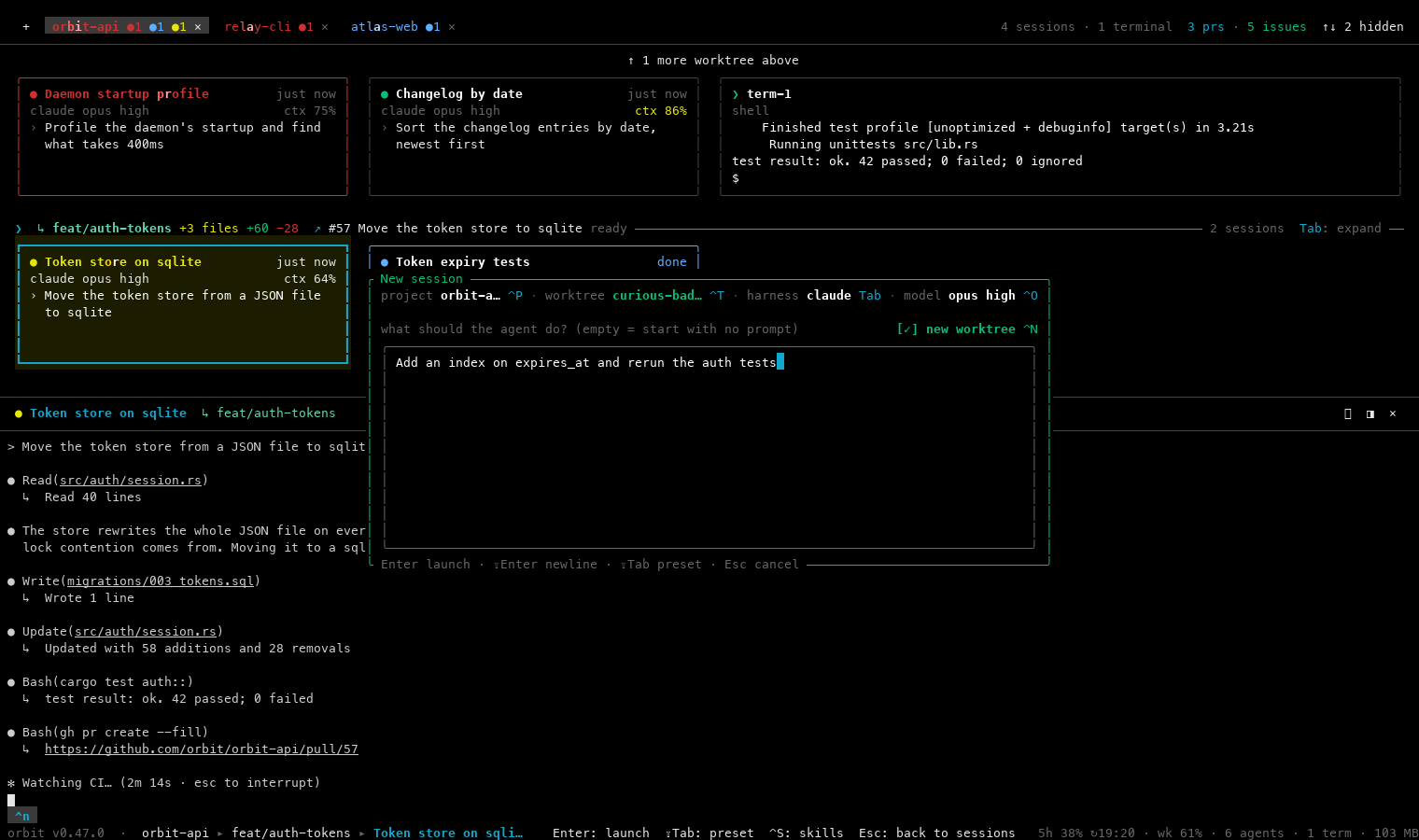
p, type the task, Enter. Ctrl+N runs it in a fresh git worktree so parallel agents never edit the same files.
Tick exactly the skills a prompt should use, personal, project or plugin. Save a set as a workflow and commit it for your team.
The footer shows your plan's 5-hour and weekly use, and each card shows how full its context is: amber from 80%, red from 95%.
A graphify knowledge graph of every checkout, kept fresh with no LLM, so Claude queries the graph before grepping file by file.
Diff with reviewed marks, a full-screen git graph, fuzzy file finder, search in files and a file tree, all scoped to the card's checkout.
Every band shows its branch's pull request. Read, diff and comment on PRs, or start a session on any issue. Needs gh.
Say "do this in a worktree" or "start a session that writes the tests" and the session runs the right orbit command itself.
Arrows to move, letters that mean something, nothing that needs ⌥ or a dead key on an AZERTY Mac. Every key is rebindable.
orbit doctor shows what your machine has and what each missing piece unlocks. --fix installs the integrated tools once.
A closer look
Install
Pick your system. The same command installs and updates; prebuilt binaries cover Apple Silicon, Intel Macs, and x86_64 / ARM64 Linux.
Git, uv and npm through Homebrew (gh is optional, for pull requests and issues), then Claude Code itself.
$ brew install git uv node gh$ curl -fsSL https://claude.ai/install.sh | bashOther ways to install Claude Code: official setup guide. Sign in once by running claude.
With Homebrew recommended
$ brew tap amenadem/orbit https://github.com/AmenAdem/Orbit
$ brew install amenadem/orbit/orbitType the full name amenadem/orbit/orbit. A plain brew install orbit installs an unrelated Mac app.
Or with the install script, into ~/.local/bin:
$ curl -fsSL https://raw.githubusercontent.com/AmenAdem/Orbit/main/install.sh | sh$ orbit doctor --fix # installs graphify and agent-browser once
$ cd ~/code/my-app && orbitGit, curl and npm from your package manager, uv from Astral, then Claude Code.
# Debian / Ubuntu
$ sudo apt update && sudo apt install -y git curl nodejs npm
# Fedora
$ sudo dnf install -y git curl nodejs npm
# Arch
$ sudo pacman -S git curl nodejs npm$ curl -LsSf https://astral.sh/uv/install.sh | sh
$ curl -fsSL https://claude.ai/install.sh | bashOptional: GitHub CLI (gh) for pull requests and issues.
The script installs a static binary (x86_64 or aarch64) into ~/.local/bin. Set ORBIT_INSTALL_DIR to change that.
$ curl -fsSL https://raw.githubusercontent.com/AmenAdem/Orbit/main/install.sh | shIf ~/.local/bin isn't on your PATH yet, the installer says so. Add it to ~/.bashrc or ~/.zshrc:
$ export PATH="$HOME/.local/bin:$PATH"Homebrew on Linux works too: brew tap amenadem/orbit https://github.com/AmenAdem/Orbit && brew install amenadem/orbit/orbit.
$ orbit doctor --fix
$ cd ~/code/my-app && orbitOrbit's daemon needs unix sockets, so it runs on Windows through WSL2, as Linux. Native Windows and WSL1 are not supported.
In PowerShell as Administrator, then restart when it asks. This installs WSL2 with Ubuntu.
PS> wsl --installAlready have WSL? Check it is version 2 with wsl -l -v, and convert with wsl --set-version Ubuntu 2.
$ sudo apt update && sudo apt install -y git curl nodejs npm
$ curl -LsSf https://astral.sh/uv/install.sh | sh
$ curl -fsSL https://claude.ai/install.sh | bash$ curl -fsSL https://raw.githubusercontent.com/AmenAdem/Orbit/main/install.sh | sh
$ orbit doctor --fix
$ cd ~/code/my-app && orbitKeep your repositories in the Linux filesystem (~/code), not under /mnt/c: git and file watching are much faster there. Windows Terminal is a good home for Orbit.
Any platform without a prebuilt binary, or if you want to hack on Orbit. You also need git, make and the tools listed below.
$ curl --proto '=https' --tlsv1.2 -sSf https://sh.rustup.rs | sh$ git clone https://github.com/AmenAdem/Orbit.git && cd Orbit
$ make install PREFIX=$HOME/.local/bin
$ orbit reload # move a running daemon onto the new buildOr straight from git with cargo:
$ cargo install --git https://github.com/AmenAdem/Orbit orbit --lockedmake dev runs an isolated copy with its own daemon and data. See Contributing.
| Tool | What it's for | |
|---|---|---|
git | projects, worktrees, diffs | required |
claude | the Claude Code CLI Orbit runs | required |
uv | installs graphify for the code graph | required |
npm | installs agent-browser for browser testing | required |
gh | pull requests and issues | optional |
mmdc | renders Mermaid diagrams in the viewer | optional |
| Rust | only when building from source | optional |
Orbit installs graphify and agent-browser itself, once per machine, the first time each is needed. Run orbit doctor any time to see what's missing.
| System | Architecture | |
|---|---|---|
| macOS | Apple Silicon (arm64) | prebuilt |
| macOS | Intel (x86_64) | prebuilt |
| Linux | x86_64 (static musl) | prebuilt |
| Linux | aarch64 (static musl) | prebuilt |
| Windows | WSL2, as Linux | supported |
| Windows | native or WSL1 | not supported |
| Anything else | with cargo | from source |
When a release is out, Orbit's footer shows ⇡ vX.Y.Z. One command updates and moves the running daemon onto the new binary without stopping a session:
$ orbit upgradeAfter a plain brew upgrade, run orbit reload to do that last step yourself.
$ orbit kill                       # stops the daemon and every session
$ rm ~/.local/bin/orbit            # script install
$ brew uninstall amenadem/orbit/orbit # HomebrewSettings and the session database live where orbit config path points; remove that folder too for a clean slate.
Quickstart
Open a terminal inside a repository and run orbit. Then:
orbit again to pick them up.Sessions name themselves from your first prompt (Fix Login Redirect, not agent-3). Press h any time for every key.
The keys that matter
Documentation
Start with the user guide; the rest goes deeper on each topic.
Contribute
Bug reports, doc fixes and focused pull requests are all welcome. Orbit moves fast, so small changes land quickest.
$ make dev # isolated copy: own daemon, own data$ make ci # fmt, clippy -D warnings, tests
Built by
I build Orbit for the way I work every day: several Claude Code sessions at once, each in its own worktree, all on one screen. It started as a fork of nebula and has been reshaped around a Claude-first workflow, with skills per prompt, a built-in code graph and keys that work on any keyboard.
curl -fsSL https://raw.githubusercontent.com/AmenAdem/Orbit/main/install.sh | sh